| |
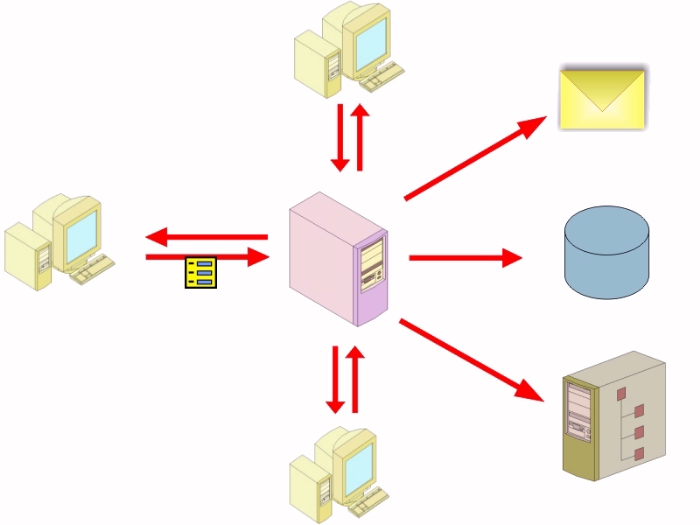
The Workflow System does a number of things with an incoming form,
such as putting the form's data into an Access, Oracle, SQL Server, or MySQL database,
or sending a copy of the form to another user or server, or rendering the file in the XML format.
The System has four components:
- The Workflow Console, which records all scripting instructions in the configuration
file through a graphical user interface
- The Workflow.mdb configuration file, which holds the instructions
- The Workflow Service, which executes the instructions recorded in the configuration file
- The FormMail(TM) client, which works with the Service to deliver forms over a local
area network without email
All scripting is based on two pieces of information in the file's header: configuration name and return number. When a form is being designed, the user gives it a configuration name, and the return number is automatically set to "0." After the form is distributed, whenever a user completes it and returns it to the server, the Workflow Engine will increment the return number by 1.
The Workflow System refers to this header information to determine how the form should be treated when it is returned.
A script example follows:

The list of available commands includes:
1. Branch to another step
2. Copy the form into a directory
3. Move the form into an Archive
4. Delete the form
5. Move the form into a directory
6. Preserve the form's latest version in a database
7. Print the form
8. Put the form's data into the database |
9. Render the form's data in XML
10. Reset the form's return number
11. Run a custom database function
12. Send an email message
13. Start an asynchronous application
14. Start another application and wait
15. Transmit the form via FTP
16. Transfer the form with FormMail |

All actions can be taken automatically or in response to the
existence of certain conditions, such as the passing of a deadline or the
answer to a certain question on the form. All told,
the Returnable Forms Workflow Engine can eliminate mindless
clerical tasks in your office and maximize your organization's productivity.
| |